Community connections
Member Directory
Help members find and connect with the right people, faster.
Connect your community
Search and filter with purpose
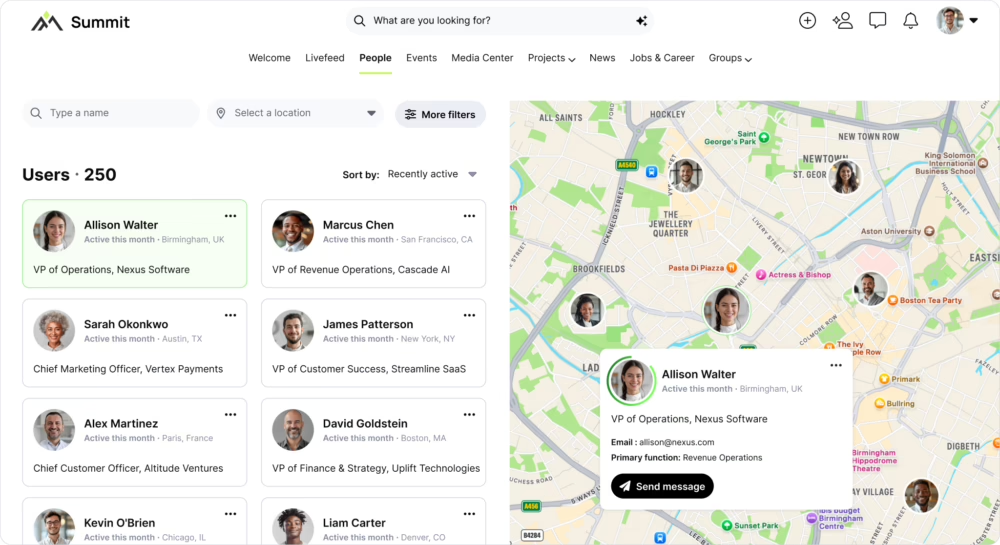
Let members quickly find mentors, potential collaborators, or industry peers using filters like role, organization, interests, skills, or location.
View your community on an interactive map
Help members discover nearby connections and give admins a clear view of where engagement is happening.
Personalize profiles with built in privacy
Admins control which profile fields appear directory-wide, while members manage their individual visibility settings, ensuring privacy at both platform and personal levels.
How Member Directory works
Admins configure discovery
Set which fields are searchable, filterable, or visible on member cards, control filter order, and define default privacy settings.
Members find and connect
Search by keyword or filters, switch between list and map views, browse profiles, and message directly.
Privacy respected

Members control what’s visible, with options to hide fields, share with favorites only, or opt out—fully GDPR compliant.
Other features
Suggest other Hivebrite features to link out to.
User Profile + Activation
Guide new members from signup to engagement with personalized onboarding and smart profiles.

People Recommendations
Help members discover valuable connections with personalized, intelligent suggestions.
Communications
Meet members where they are with email, mobile, in-app, or automated digests.

FAQs
The map displays member locations based on profile information and only shows what members have chosen to make visible.

Yes. Admins define visible fields, and members manage their own privacy settings.
Yes. Members can filter profiles by location or explore connections visually through the map.
Yes. Members control their own visibility and can choose to hide their profile from the directory, remove their location from the map, or hide specific profile fields at any time.
Admins can include standard fields (name, organization, role, location) and custom fields. The directory is fully customizable to match your community’s needs.
Yes. The interactive map displays members worldwide and allows filtering by region, country, or city to help members find connections in specific areas.
Admins control directory visibility. You can make it members-only or allow public access to promote your community (while respecting individual member privacy settings).