How to measure member engagement in your online community

Your community strategy and goals will determine the best metrics for tracking your community engagement and success.

Download free template

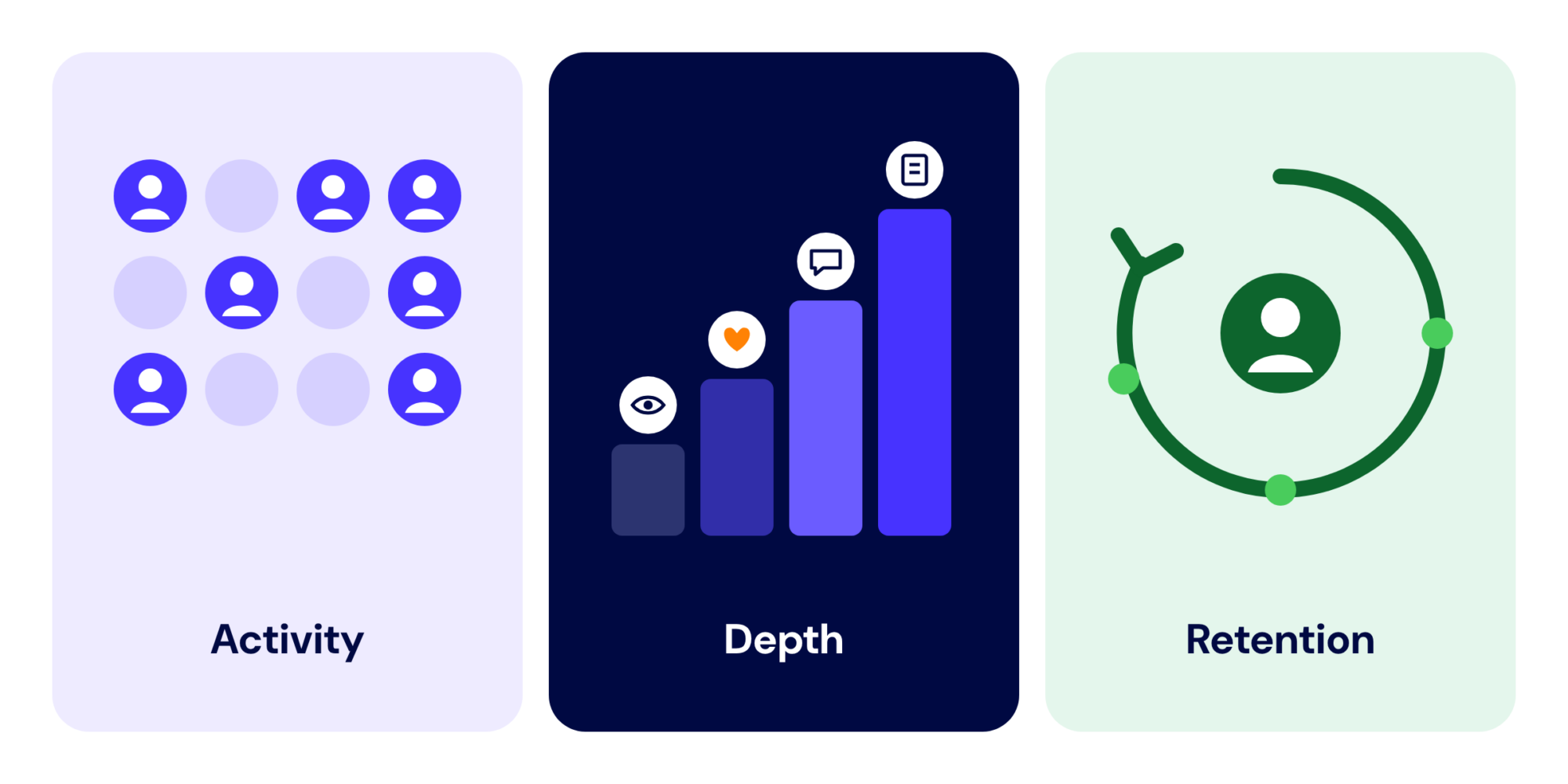
Member engagement is the set of actions members take to use, contribute to, and return to your community. To measure it, track three dimensions together: activity, depth, and retention. Activity shows you how many members participate. Depth shows you how meaningfully they participate. Retention shows you whether that participation continues over time.

Whether you use Hivebrite Community Analytics, another reporting system, or a spreadsheet, the measurement process is the same: define the actions that matter, choose a consistent time period, compare the results with a useful baseline, and decide what you will do when the numbers change..

The free metrics spreadsheet linked on this page gives you a practical place to start. It includes space for quantitative metrics as well as member quotes and stories, because numbers explain what happened while member evidence often helps explain why.

The member engagement metrics to track

Start with a small set of metrics that maps to your community goals. A useful measurement set usually includes membership and growth metrics, activity metrics, and conversion or outcome metrics. You do not need to count every available event. A metric earns its place when it helps you make a decision.

An active user is a unique member who completes at least one defined engagement action during a stated period. The action might be logging in, viewing a discussion, posting, commenting, registering for an event, or attending one. There is no universal definition, so write yours down and use it consistently. For member-focused reporting, exclude administrators from the numerator and denominator where possible, since admin activity can make a community look more active than it is for members.

Community membership and growth metrics

Metrics What it tells you Formula
Total members The size of the registered member base Count of members at the end of the period
New members Whether the community is attracting new people Members who joined during the period
Member growth rate How quickly membership is changing (New members – members lost) / members at start of period x 100
Activated members How many members completed your chosen onboarding actions Members who completed the activation steps / new members x 100
Active members How many unique members took at least one defined action Unique members with one or more qualifying actions in the period
Active member rate The share of the member base that participated Active members / eligible members x 100
Member retention rate Whether members remain active or enrolled over time Members still active at the end of the period / members in the starting cohort x 100

Use the same denominator whenever you compare periods. If you measure active member rate against all registered members one month and against activated members the next, the change may reflect a change in definition rather than a change in behavior.

Community activity metrics

Metric What it tells you Formula or definition
Daily active users (DAU) Participation on a typical day Unique members with a qualifying action in one day
Weekly active users (WAU) Breadth of participation across a week Unique members with a qualifying action in seven days
Monthly active users (MAU) Reach across a monthly cycle Unique members with a qualifying action in the month
Interaction rate Whether members are doing more than visiting Members with at least one qualifying interaction / eligible members x 100
Contribution rate How many members create or add something Members who posted, commented, replied, or made another defined contribution / eligible members x 100
Contributions per contributor Depth among members who participate Total qualifying contributions / number of contributors
Returning member rate Whether members come back after an earlier visit Members active in both the current and previous period / members active in the previous period x 100
Event participation rate Whether registered members attend or participate Members who attended or participated / registered members x 100

A login alone is not proof of meaningful engagement on its own. A login can be a useful activity signal, but combine it with content views, contributions, event participation, or member-to-member actions when you want to understand depth.

Community conversion metrics

Metric What it tells you Formula
Visitor-to-member conversion rate How well the community turns visitors into members New members / unique visitors x 100
Invitation acceptance rate Whether invitations reach the right people with a clear reason to join Accepted invitations / invitations sent x 100
Activation rate Whether new members reach the first value moment Members who complete activation / new members x 100
Event registration conversion rate How well an event page turns interest into registration Registrations / event page visitors or invitations x 100
Opportunity application rate Whether members act on opportunities shared in the community Applications / opportunity views x 100
Renewal rate Whether members continue into the next cycle Renewed members / members due for renewal x 100

Choose one primary metric for each stage of your member journey. For example, activation may be the best early-life metric, contribution rate may be the best measure of participation, and renewal rate may be the clearest outcome metric for a membership community.

How to build a member engagement score

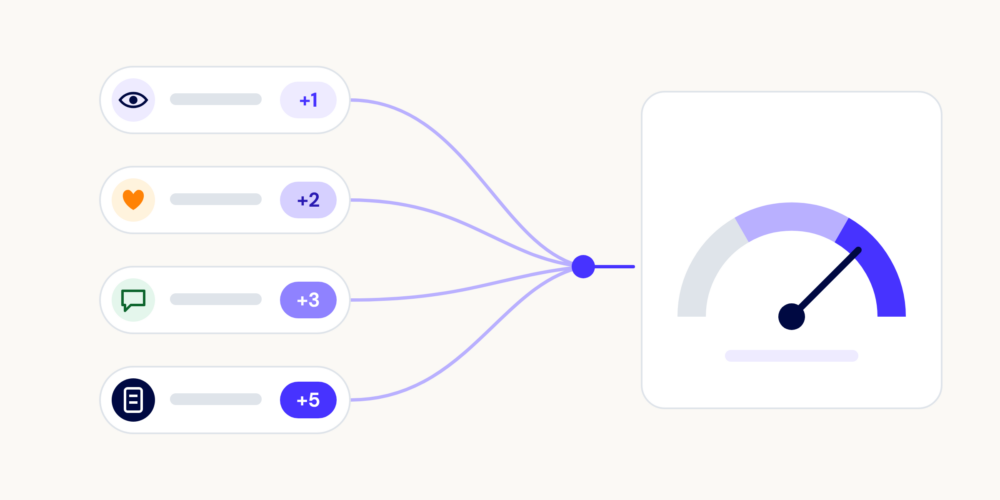
Hivebrite also includes native Engagement Scoring. The feature assigns points to predefined member actions, such as posting, commenting, liking content, and participating in events, then combines those points into member scores and rankings. Admins can review score breakdowns and analyze activity over a defined period. Because the score depends on the actions and point values configured for a community, pair it with focused metrics such as active member rate, contribution rate, and retention for the clearest picture. 

If you are not using Hivebrite’s native Engagement Scoring, you can build a simple proxy score in a spreadsheet or reporting system. A custom score should combine only the actions that reflect value in your community, use a consistent time window, and never replace the underlying metrics. Its purpose is to help you segment members, spot changes, and decide where to focus your attention.

For a custom score, start with this formula:

Engagement score = sum of qualifying actions x their weights during a defined period

Build the score in five steps:

  1. Choose the actions that reflect value in your community. Examples include posting, commenting, replying, attending an event, registering for an event, completing a profile, starting a discussion, or making a useful connection.
  2. Set a time window, such as 30 or 90 days. Use the same window for every member in the comparison.
  3. Assign simple weights. A contribution that requires more effort can receive more weight than a passive view. For example, you might assign one point to a content view, two to a reaction, three to a comment, and five to an original post or event attendance. These are starting assumptions, not industry standards.
  4. Cap repeated actions where necessary. One member who views the same page 100 times should not automatically appear more engaged than a member who contributes thoughtfully several times.
  5. Test the score against outcomes. Compare high-, medium-, and low-score groups with activation, event participation, satisfaction, or renewal. If the score does not help you make a decision, simplify it.

Keep the component metrics visible. A single score can hide important differences: two members may have the same total score even though one contributes and the other only consumes content. If you use Hivebrite, use the activity and interaction data available in your reporting to define the actions in a way that matches your community and your plan. Do not assume that the platform automatically applies the scoring model above.

Measuring member engagement year-round, not just at the conference

A conference can create a sharp spike in activity, but a spike is not the same as sustained engagement. To measure engagement year-round, separate event-period activity from the rest of the calendar and report both.

Create an event cohort and a non-event baseline. For example, compare the 30 days before the conference, the conference period, and the 30 days after it with an ordinary 30-day period later in the year. Track active member rate, contribution rate, event participation, returning member rate, and the number of members who take action in more than one period.

Then build reasons to return between major events. That might include smaller member meetups, mentoring, discussion prompts, job or opportunity sharing, peer advice, office hours, or a regular digest of useful activity. The specific program matters less than the measurement discipline: give each initiative a clear goal, a time window, and a small number of success metrics.

A useful year-round dashboard should answer three questions:

  • How many members participate outside the event window?
  • Which actions bring members back more than once?
  • Are the same members participating repeatedly, or are different members taking turns?

Report rolling 30- or 90-day trends alongside event-period results. That makes it harder for one successful conference to hide a longer decline inordinary participation.

How to connect engagement to renewals

To understand whether engagement is associated with renewal, compare the renewal rate of engaged and non-engaged members in the same renewal cycle. Do not compare one year’s engaged members with another year’s entire member base. The groups need the same renewal deadline, observation window, and membership context.

Use a simple comparison:

Renewal rate gap = renewal rate of engaged members – renewal rate of non-engaged members

Define engaged before you look at the renewal result. For example, engaged members might be members with at least one qualifying action in the previous 90 days, or members above a documented engagement-score threshold. Then report:

Group Members due for renewal Members renewed Renewal rate
Engaged members [count] [count] Renewed / due for renewal x 100
Non-engaged members [count] [count] Renewed / due for renewal x 100
Gap – – Engaged rate – non-engaged rate

Segment the result by member type, tenure, plan, geography, and other factors that may affect renewal. A renewal gap is useful evidence, but it is not proof that engagement caused renewal. Use it to decide which relationships to investigate, then add member feedback, cancellation reasons, and qualitative evidence before making a causal claim to the board.

Hivebrite Community Analytics can help teams review community activity and share KPI trends with stakeholders. The exact fields and reporting options available to you depend on your setup, so confirm the data definition before using it in a renewal model.

What’s a good engagement rate?

There is no single engagement rate that is good for every community. A useful benchmark depends on the denominator, the time period, the member journey, the community’s purpose, and the action you count as engagement.

Start with your own baseline. Compare the same metric over several comparable periods, then segment it by member type and lifecycle stage. A 20% monthly active member rate may be strong for one community and weak for another; the number is only meaningful when the definition and context stay stable.

As a directional starting point, Hivebrite’s guidance on mobile community engagement refers to roughly 15-20% of members as daily active users for a healthy community. Treat that as a starting benchmark, not a pass/fail target. Daily activity is also only one dimension of engagement, so pair it with contribution, depth, and retention metrics. Source: https://hivebrite.io/downloads/mobile-engagement-online-communities/

The Community Growth & Benchmark Report 2026 also shows why measurement quality matters: 53.7% of surveyed community professionals said they do not compare metrics between members and non-members, while 19% said they do not consistently track metrics. Those figures describe measurement gaps, not a target engagement rate. Source: https://hivebrite.io/downloads/community-growth-benchmark-report/

How to track community engagement metrics

Use three reporting cadences instead of waiting for a quarterly report:

  • Weekly: check leading indicators such as active members, contributions, event registrations, and unusual changes in key segments. Use these checks to spot issues early and decide whether to act.
  • Monthly: report the agreed KPI set, compare it with the previous period and the same period last year where possible, and record what changed in the community calendar.
  • Quarterly or at renewal: connect engagement with outcomes such as retention, renewals, revenue, applications, fundraising, or member satisfaction.

Keep the definitions beside the numbers. A simple tracking sheet should record the metric name, formula, denominator, date range, source, owner, and decision threshold. Add a notes column for campaigns, events, product changes, or other context that could explain a movement.

Spreadsheets are still a practical way to start tracking community performance. Hivebrite has created a free community metrics spreadsheet in Google Sheets to help you record quantitative measures alongside member quotes and stories. Download the [free community metrics spreadsheet](https://hivebrite.io/downloads/how-to-measure-community-engagement-template/#top) and adapt it to your community.

If your community runs on Hivebrite, Community Analytics can provide dashboards and reports for activity and content interaction, with views that can be filtered by dimensions such as time period or group and exported for stakeholder reporting, subject to your setup. Use the same reporting definition in your spreadsheet so the two sources do not produce competing numbers.

What to do when a metric moves

A metric change is a reason to investigate, not an instruction to react immediately. First confirm that the definition, denominator, date range, data source, and tracking process stayed the same. Then look for a change in member behavior, programming, access, or data quality before choosing an action.

Signal Likely cause What to check Action
Active member rate falls Less relevant programming, seasonal behavior, access friction, or a tracking change Compare member segments, content reach, logins, and the community calendar Interview a sample of inactive members, improve the next member journey, and set a recovery baseline
Contributions fall while views stay steady Members are consuming content but not finding a reason to contribute Review prompts, unanswered questions, response time, and contribution by segment Add specific prompts, invite member expertise, and close the loop on replies
New members rise but activation falls Acquisition is reaching a broader or less qualified audience, or onboarding is unclear Check invitation source, activation steps, time to first action, and drop-off point Simplify the first-value journey and align the invitation with what members will find
Event activity spikes then drops Engagement is concentrated around the event Compare pre-event, event, and post-event cohorts and measure repeat action Create a post-event follow-up path and monitor 30- and 90-day return rates
Renewal gap widens Engaged and non-engaged members may be receiving different value, or the groups differ in tenure or type Check renewal cohort, member type, tenure, participation mix, and cancellation reasons Investigate the member experience and test a retention intervention before claiming causation

Write down the decision you made after each meaningful metric change. Over time, this creates a record of what your community tried and which actions changed member behavior.

Download Hivebrite’s free community metrics spreadsheet

Use the free community metrics spreadsheet to organize the numbers behind your community story. It is designed as a starting point, so remove fields that do not fit your goals and add the actions, outcomes, and member segments that matter to your organization.

The template also gives you a place to capture qualitative evidence, including member quotes and stories. That context helps explain why a metric moved and gives stakeholders a clearer picture than a dashboard alone.

[Download the free community metrics spreadsheet](https://hivebrite.io/downloads/how-to-measure-community-engagement-template/#top)

Have an idea for a future version? Follow Hivebrite on LinkedIn or get in touch with our team.

Frequently Asked Questions

Member engagement is the set of actions that show how members participate in and receive value from a community. Measure it through activity, depth, and retention rather than through one number alone.

Choose a defined period and qualifying action, then divide the number of unique members who completed at least one action by the eligible member base and multiply by 100. State whether administrators, inactive accounts, or unactivated members are included.

There is no universal target because communities use different definitions, denominators, and time periods. Start with a consistent baseline, compare like with like, and use external figures such as the 15-20% daily active user starting point with caution and context.

A member engagement score combines several defined actions into one directional measure by applying weights to each action. Keep the component metrics visible and validate the score against outcomes before using it to segment members or guide decisions.

Check leading indicators weekly, report the core KPI set monthly, and connect engagement with outcomes quarterly or at renewal. The right cadence is frequent enough to spot change and slow enough to avoid reacting to normal day-to-day noise.

They can count as active or consuming members if they take a defined action such as reading content or viewing a resource, but they should not be grouped with contributors without making that distinction clear. Report passive consumption and active contribution separately when both matter to your goal.

Compare renewal rates for engaged and non-engaged members in the same renewal cycle, show the gap, and explain how you defined each group. Present the result as an association unless you have stronger evidence, then combine it with member feedback and cancellation data to explain the relationship.

You need a reliable source of member and activity data, a documented set of definitions, and a place to track results over time. That could be Hivebrite Community Analytics, another reporting system, or a spreadsheet. The platform matters less than using consistent definitions and connecting the numbers to decisions.

Download Hivebrite’s free community metrics spreadsheet

We have created a free community metrics tracking spreadsheet template designed to help you track the metrics to tell your community story. As a bonus, our community tracking template also has a sheet designed to help you record qualitative anecdotes and quotes from members. This template is meant to be a starting point that you customize for your own unique community. Feel free to remove the fields that don’t apply to you and add new metrics to track. Have ideas on how to update the next version? Drop us a line! You can find us on LinkedIn or email us at [email protected].